Advanced Statistical Data Analysis
Notebook Cell
# Install and load required packages
install.packages("boot")
install.packages("car")
install.packages("MASS")
install.packages("mgcv")
install.packages("splines")
install.packages("gRbase")
install.packages("gRain")
install.packages("pcalg")
install.packages("AER")

library(DAAG)
library(boot)
library(car)
library(MASS)
library(mgcv)
library(splines)
library(gRbase)
library(gRain)
library(pcalg)
library(AER)

# Load custom datasets from advanced-statistical-data-analysis/ folder
# Challenger O-ring data
chal <- read.table("advanced-statistical-data-analysis/O-rings.dat", header = TRUE)

# Dial-a-Ride calls data
dial <- read.table("advanced-statistical-data-analysis/Dial-a-ride.dat", header = TRUE)

# Promotion data
load("advanced-statistical-data-analysis/promotion.rda")

# Source custom functions
source("advanced-statistical-data-analysis/RFn_Plot-glmSim.R")

# Load built-in datasets
library(datasets)
data(mtcars)
data(warpbreaks)

set.seed(42)
FF <- data.frame(
  FoodCon = runif(20, 3, 7),
  lMaxWt = runif(20, 5, 7.5),
  Temp = sample(c(13, 17, 23), 20, replace = TRUE),
  lAR = runif(20, -0.5, 0.8),
  Food = factor(sample(c("C", "H"), 20, replace = TRUE))
)

# dial can be simulated with:
dial <- data.frame(
  Calls = sample(10:20, 10),
  Center = factor(rep(c("A", "B"), each = 5)),
  Time = 1:10
)

ship <- data.frame(
  Damages = c(0, 0, 1, 0, 0, 1, 0, 0, 0, 0, 1, 0, 1, 0, 0, 0, 0, 0, 0, 0),
  Year = factor(rep(c("60", "65", "70", "75"), each = 5)),  # 4 levels × 5 = 20
  Month = factor(rep(c("60", "75"), each = 10)),             # 2 levels × 10 = 20
  Exposure = c(43, 45, 47, 61, 64, 65, 67, 71, 74, 77, 77, 79, 80, 81, 82, 85, 86, 87, 88, 90)
)
The downloaded binary packages are in
	/var/folders/mg/f7gk10vj1_153rz1zkvd13_00000gn/T//RtmpprnLpL/downloaded_packages

The downloaded binary packages are in
	/var/folders/mg/f7gk10vj1_153rz1zkvd13_00000gn/T//RtmpprnLpL/downloaded_packages

The downloaded binary packages are in
	/var/folders/mg/f7gk10vj1_153rz1zkvd13_00000gn/T//RtmpprnLpL/downloaded_packages

The downloaded binary packages are in
	/var/folders/mg/f7gk10vj1_153rz1zkvd13_00000gn/T//RtmpprnLpL/downloaded_packages
The downloaded binary packages are in
	/var/folders/mg/f7gk10vj1_153rz1zkvd13_00000gn/T//RtmpprnLpL/downloaded_packages

The downloaded binary packages are in
	/var/folders/mg/f7gk10vj1_153rz1zkvd13_00000gn/T//RtmpprnLpL/downloaded_packages

The downloaded binary packages are in
	/var/folders/mg/f7gk10vj1_153rz1zkvd13_00000gn/T//RtmpprnLpL/downloaded_packages

The downloaded binary packages are in
	/var/folders/mg/f7gk10vj1_153rz1zkvd13_00000gn/T//RtmpprnLpL/downloaded_packages
Advanced Regression Modelling
Best Practices and Key Takeaways
Always check model assumptions using diagnostic plots (Tukey-Anscombe, Normal Q-Q, Scale-Location, Residual vs Leverage). The enhanced diagnostic plots with simulation envelopes (
plot.glmSim()) provide rigorous checks against model assumptions.Transform variables when appropriate using Tukey’s First-Aid Transformations (log for positive continuous, square-root for counts, logit for proportions). These often lead to simpler, more interpretable models.
Use AIC for model selection, not just p-values from marginal tests. Remember that AIC is for model selection, not hypothesis testing.
Check for overdispersion in count data and use quasi-models if needed. The quasi-Poisson and quasi-binomial families account for extra variation.
Validate models using cross-validation, PRESS, or other validation techniques. The
cv.glm()function provides k-fold cross-validation.Interpret coefficients in the context of the link function (e.g., odds ratios for logistic, multiplicative effects for log link). For logistic regression, always predict on the link scale and transform back to ensure valid confidence intervals.
Make predictions on the appropriate scale (response vs. link). For GLMs with non-linear link functions, the link scale is often more stable for prediction and confidence intervals.
Foundations of Regression Analysis
Regression modelling is the art of explaining or modelling the relationship between a response variable and one or more explanatory variables (predictors) , where the relationship is masked by random noise. The goal is to identify a function such that , where represents random variation.
Multiple Linear Regression Model:
Where:
is the response (must be continuous)
are predictors (can be continuous, discrete, binary, or categorical)
are independent error terms
are unknown regression coefficients
Matrix Form:
Model Assumptions:
Linearity: The relationship between predictors and response is linear in parameters
Independence: Errors are stochastically independent
Homoscedasticity: Constant variance across all levels of predictors
Normality: Errors are normally distributed
No Perfect Multicollinearity: Predictors are not linearly dependent
Data Transformation: Tukey’s First-Aid Transformations
When the relationship between variables is non-linear or the distribution is skewed, transformations can often linearize the relationship and stabilize variance. Mosteller and Tukey (1977) recommend these first-aid transformations as a starting point:
| Variable Type | Transformation | When to Use | Example |
|---|---|---|---|
| Positive continuous (concentrations, amounts) | Logarithm | Right-skewed data, multiplicative relationships | log(x), log10(x) |
| Count data | Square-root | Poisson-like data with variance ≈ mean | sqrt(x) |
| Counted fractions/proportions | Logit | Percentages (0-100%) | log((x+0.005)/(1.01-x)) |
Why Transform?
Linearize relationships: Makes non-linear patterns linear
Stabilize variance: Addresses heteroscedasticity
Normalize residuals: Helps meet normality assumption
Improve interpretability: Coefficients represent multiplicative effects
Notebook Cell
# Load and explore mtcars data
library(datasets)
str(mtcars)
summary(mtcars)
'data.frame': 32 obs. of 11 variables:
$ mpg : num 21 21 22.8 21.4 18.7 18.1 14.3 24.4 22.8 19.2 ...
$ cyl : num 6 6 4 6 8 6 8 4 4 6 ...
$ disp: num 160 160 108 258 360 ...
$ hp : num 110 110 93 110 175 105 245 62 95 123 ...
$ drat: num 3.9 3.9 3.85 3.08 3.15 2.76 3.21 3.69 3.92 3.92 ...
$ wt : num 2.62 2.88 2.32 3.21 3.44 ...
$ qsec: num 16.5 17 18.6 19.4 17 ...
$ vs : num 0 0 1 1 0 1 0 1 1 1 ...
$ am : num 1 1 1 0 0 0 0 0 0 0 ...
$ gear: num 4 4 4 3 3 3 3 4 4 4 ...
$ carb: num 4 4 1 1 2 1 4 2 2 4 ...
      mpg             cyl             disp             hp
 Min.   :10.40   Min.   :4.000   Min.   : 71.1   Min.   : 52.0
 1st Qu.:15.43   1st Qu.:4.000   1st Qu.:120.8   1st Qu.: 96.5
 Median :19.20   Median :6.000   Median :196.3   Median :123.0
 Mean   :20.09   Mean   :6.188   Mean   :230.7   Mean   :146.7
 3rd Qu.:22.80   3rd Qu.:8.000   3rd Qu.:326.0   3rd Qu.:180.0
 Max.   :33.90   Max.   :8.000   Max.   :472.0   Max.   :335.0
      drat             wt             qsec             vs
 Min.   :2.760   Min.   :1.513   Min.   :14.50   Min.   :0.0000
 1st Qu.:3.080   1st Qu.:2.581   1st Qu.:16.89   1st Qu.:0.0000
 Median :3.695   Median :3.325   Median :17.71   Median :0.0000
 Mean   :3.597   Mean   :3.217   Mean   :17.85   Mean   :0.4375
 3rd Qu.:3.920   3rd Qu.:3.610   3rd Qu.:18.90   3rd Qu.:1.0000
 Max.   :4.930   Max.   :5.424   Max.   :22.90   Max.   :1.0000
       am              gear            carb
 Min.   :0.0000   Min.   :3.000   Min.   :1.000
 1st Qu.:0.0000   1st Qu.:3.000   1st Qu.:2.000
 Median :0.0000   Median :4.000   Median :2.000
 Mean   :0.4062   Mean   :3.688   Mean   :2.812
 3rd Qu.:1.0000   3rd Qu.:4.000   3rd Qu.:4.000
 Max.   :1.0000   Max.   :5.000   Max.   :8.000
# Apply Tukey's First-Aid Transformations
mtcars1 <- data.frame(
lMPG = log(mtcars$mpg), lDisp = log(mtcars$disp), lHP = log(mtcars$hp), lWT = log(mtcars$wt), wCarb = sqrt(mtcars$carb), wCyl = sqrt(mtcars$cyl), wGear = sqrt(mtcars$gear), drat = mtcars$drat, qsec = mtcars$qsec, vs = mtcars$vs, am = mtcars$am)Output
Model Fitting and Inference
Least Squares Estimation: The ordinary least squares (OLS) estimator minimizes the sum of squared residuals:
This is equivalent to the maximum likelihood estimator when errors are normally distributed.
# Fit linear model
model <- lm(lMPG ~ lDisp + wGear + am, data = mtcars1)
summary(model)
Call:
lm(formula = lMPG ~ lDisp + wGear + am, data = mtcars1)

Residuals:
     Min       1Q   Median       3Q      Max
-0.22846 -0.09056 -0.00933  0.08235  0.32026

Coefficients:
            Estimate Std. Error t value Pr(>|t|)
(Intercept)  5.43775    0.50879  10.688 2.17e-11 ***
lDisp       -0.46064    0.05328  -8.647 2.15e-09 ***
wGear       -0.02494    0.21158  -0.118    0.907
am           0.00452    0.08608   0.053    0.958
---
Signif. codes:  0 ‘***’ 0.001 ‘**’ 0.01 ‘*’ 0.05 ‘.’ 0.1 ‘ ’ 1

Residual standard error: 0.1326 on 28 degrees of freedom
Multiple R-squared:  0.8208,	Adjusted R-squared:  0.8016
F-statistic: 42.76 on 3 and 28 DF,  p-value: 1.39e-10
Variable Selection with AIC
When many predictors appear non-significant, model selection helps find the simplest adequate model. Akaike’s Information Criterion (AIC) balances model fit and complexity:
Where is the total number of estimated parameters (including ).
Interpretation: Lower AIC = better model (rewards fit, penalizes complexity)
# Stepwise selection (both directions)
full.model <- lm(lMPG ~ lDisp + lHP + lWT + drat + qsec + wCarb + wCyl + wGear + vs + am,
               data = mtcars1)
step.model <- step(full.model, direction = "both")
# or: direction="forward" to only add terms
# or: direction="backward" to only remove terms

# Compare AIC values
AIC(full.model)  # -38.0116232029208 (more complex)
AIC(step.model)  # -48.3532763205495 (simpler, better fit)
Output
Start:  AIC=-130.82
lMPG ~ lDisp + lHP + lWT + drat + qsec + wCarb + wCyl + wGear +
    vs + am

        Df Sum of Sq     RSS     AIC
- drat   1  0.000040 0.26986 -132.82
- qsec   1  0.002350 0.27217 -132.55
- vs     1  0.002637 0.27246 -132.51
- am     1  0.003992 0.27381 -132.35
- wCyl   1  0.009593 0.27941 -131.71
- lDisp  1  0.011167 0.28099 -131.53
<none>               0.26982 -130.82
- lHP    1  0.017922 0.28774 -130.77
- wCarb  1  0.021488 0.29131 -130.37
- lWT    1  0.029303 0.29912 -129.53
- wGear  1  0.037225 0.30704 -128.69

Step:  AIC=-132.82
lMPG ~ lDisp + lHP + lWT + qsec + wCarb + wCyl + wGear + vs +
    am

        Df Sum of Sq     RSS     AIC
- qsec   1  0.002313 0.27217 -134.55
- vs     1  0.002606 0.27247 -134.51
- am     1  0.003955 0.27381 -134.35
- wCyl   1  0.009768 0.27963 -133.68
- lDisp  1  0.011133 0.28099 -133.53
<none>               0.26986 -132.82
- lHP    1  0.019281 0.28914 -132.61
- wCarb  1  0.022980 0.29284 -132.20
- lWT    1  0.029993 0.29985 -131.45
+ drat   1  0.000040 0.26982 -130.82
- wGear  1  0.037507 0.30736 -130.66

Step:  AIC=-134.55
lMPG ~ lDisp + lHP + lWT + wCarb + wCyl + wGear + vs + am

        Df Sum of Sq     RSS     AIC
- vs     1  0.001432 0.27360 -136.38
- am     1  0.007305 0.27948 -135.70
- wCyl   1  0.008183 0.28035 -135.60
- lDisp  1  0.016096 0.28827 -134.71
<none>               0.27217 -134.55
- lHP    1  0.023733 0.29590 -133.87
- wCarb  1  0.031691 0.30386 -133.02
- lWT    1  0.032500 0.30467 -132.94
+ qsec   1  0.002313 0.26986 -132.82
+ drat   1  0.000003 0.27217 -132.55
- wGear  1  0.037537 0.30971 -132.41

Step:  AIC=-136.38
lMPG ~ lDisp + lHP + lWT + wCarb + wCyl + wGear + am

        Df Sum of Sq     RSS     AIC
- am     1  0.005878 0.27948 -137.70
- wCyl   1  0.010821 0.28442 -137.14
- lDisp  1  0.014664 0.28827 -136.71
<none>               0.27360 -136.38
- lHP    1  0.025731 0.29934 -135.50
- wCarb  1  0.030412 0.30402 -135.00
+ vs     1  0.001432 0.27217 -134.55
+ qsec   1  0.001139 0.27247 -134.51
- wGear  1  0.036105 0.30971 -134.41
- lWT    1  0.036238 0.30984 -134.40
+ drat   1  0.000000 0.27360 -134.38

Step:  AIC=-137.7
lMPG ~ lDisp + lHP + lWT + wCarb + wCyl + wGear

        Df Sum of Sq     RSS     AIC
- wCyl   1 0.0083098 0.28779 -138.76
- lDisp  1 0.0118540 0.29134 -138.37
<none>               0.27948 -137.70
- wCarb  1 0.0292247 0.30871 -136.51
- lHP    1 0.0293416 0.30882 -136.50
- wGear  1 0.0304382 0.30992 -136.39
+ am     1 0.0058778 0.27360 -136.38
- lWT    1 0.0311628 0.31064 -136.31
+ qsec   1 0.0043786 0.27510 -136.20
+ drat   1 0.0001631 0.27932 -135.72
+ vs     1 0.0000050 0.27948 -135.70

Step:  AIC=-138.76
lMPG ~ lDisp + lHP + lWT + wCarb + wGear

        Df Sum of Sq     RSS     AIC
- lDisp  1  0.004577 0.29237 -140.25
<none>               0.28779 -138.76
- wCarb  1  0.020996 0.30879 -138.51
- wGear  1  0.022152 0.30994 -138.39
- lHP    1  0.024521 0.31231 -138.14
+ wCyl   1  0.008310 0.27948 -137.70
+ am     1  0.003367 0.28442 -137.14
+ vs     1  0.000951 0.28684 -136.87
+ qsec   1  0.000941 0.28685 -136.87
+ drat   1  0.000842 0.28695 -136.85
- lWT    1  0.055166 0.34296 -135.15

Step:  AIC=-140.26
lMPG ~ lHP + lWT + wCarb + wGear

        Df Sum of Sq     RSS     AIC
- wCarb  1  0.017460 0.30983 -140.40
<none>               0.29237 -140.25
- wGear  1  0.029021 0.32139 -139.23
+ lDisp  1  0.004577 0.28779 -138.76
+ qsec   1  0.003739 0.28863 -138.67
+ am     1  0.002699 0.28967 -138.55
+ wCyl   1  0.001033 0.29134 -138.37
+ drat   1  0.000498 0.29187 -138.31
+ vs     1  0.000003 0.29237 -138.26
- lHP    1  0.103033 0.39540 -132.59
- lWT    1  0.127849 0.42022 -130.65

Step:  AIC=-140.4
lMPG ~ lHP + lWT + wGear

        Df Sum of Sq     RSS     AIC
- wGear  1  0.012179 0.32201 -141.16
<none>               0.30983 -140.40
+ wCarb  1  0.017460 0.29237 -140.25
+ qsec   1  0.010958 0.29887 -139.55
+ drat   1  0.003949 0.30588 -138.81
+ am     1  0.003826 0.30600 -138.80
+ vs     1  0.001547 0.30828 -138.56
+ lDisp  1  0.001041 0.30879 -138.51
+ wCyl   1  0.000060 0.30977 -138.41
- lWT    1  0.209549 0.51938 -125.87
- lHP    1  0.221250 0.53108 -125.16

Step:  AIC=-141.17
lMPG ~ lHP + lWT

        Df Sum of Sq     RSS     AIC
<none>               0.32201 -141.16
+ wGear  1   0.01218 0.30983 -140.40
+ qsec   1   0.00715 0.31486 -139.88
+ lDisp  1   0.00664 0.31537 -139.83
+ wCyl   1   0.00351 0.31849 -139.52
+ vs     1   0.00222 0.31979 -139.39
+ wCarb  1   0.00062 0.32139 -139.23
+ am     1   0.00036 0.32165 -139.20
+ drat   1   0.00013 0.32187 -139.18
- lHP    1   0.21221 0.53422 -126.97
- lWT    1   0.45939 0.78140 -114.80
# Cross-validation
library(boot)
step.model.glm <- glm(step.model$terms,
                     data = model.frame(step.model),
                     family = gaussian)
cv.error <- cv.glm(mtcars1, step.model.glm, K = 11)
cv.error$delta[1]  # Mean cross-validated error
Output
Handling Categorical Predictors
Categorical variables (factors) require special handling in regression models.
Dummy Coding (Treatment Contrasts):
Creates k-1 binary variables for a factor with k levels
Each coefficient represents the difference from the reference level
Other Contrast Types:
Sum-to-zero:
contr.sum()- coefficients sum to zeroHelmert:
contr.helmert()- compares each level to mean of subsequent levelsPolynomial:
contr.poly()- for ordered factors
# Automatic dummy coding
lm(mpg ~ factor(cyl) + hp, data = mtcars)

# Change reference level
mtcars$cyl_f <- relevel(factor(mtcars$cyl), ref = "6")
lm(mpg ~ cyl_f + hp, data = mtcars)
Output
Call:
lm(formula = mpg ~ factor(cyl) + hp, data = mtcars)

Coefficients:
 (Intercept)  factor(cyl)6  factor(cyl)8            hp
    28.65012      -5.96766      -8.52085      -0.02404
Call:
lm(formula = mpg ~ cyl_f + hp, data = mtcars)

Coefficients:
(Intercept)       cyl_f4       cyl_f8           hp
   22.68246      5.96766     -2.55320     -0.02404
Detecting Multicollinearity
Multicollinearity occurs when predictors are highly correlated, making it difficult to estimate individual coefficients reliably.
Variance Inflation Factor (VIF):
Where is the coefficient of determination from regressing predictor j on all other predictors.
Interpretation:
VIF ≈ 1: No collinearity
VIF > 5: Moderate collinearity (concerning)
VIF > 10: Severe collinearity (problematic)
Solutions for Multicollinearity:
Remove one of the correlated predictors (if theoretically justified)
Combine predictors (e.g., create an index)
Use ridge regression or other regularization methods
Accept it if the goal is prediction, not inference
library(car)
vif(model)  # VIF for each predictor
Output
Model Validation Techniques
Cross-Validation:
Split data into training and test sets
Fit model on training, evaluate on test
k-fold CV: Split into k folds, use each as test set once
PRESS (Predicted Residual Sum of Squares):
Where is the predicted value when observation i is left out.
model <- glm(lMPG ~ lDisp + lHP + lWT + drat + qsec + wCarb + wCyl + wGear + vs + am,
            data = mtcars1,
            family = gaussian)

# k-fold cross-validation
library(boot)
cv.error <- cv.glm(mtcars1, model, K = 10)
cv.error$delta[1]  # MSE: 0.0154950441014118

# PRESS statistic
press <- sum(residuals(model) / (1 - hatvalues(model)))^2
press # 0.0168671439271504
Output
Advanced Topics in Linear Regression
Weighted Least Squares (WLS)
When variance is not constant (heteroscedasticity), WLS assigns different weights to observations:
Where if the variance structure is known.
# Weights inversely proportional to variance
weights <- 1 / fitted(model)^2
wls.model <- lm(mpg ~ wt + hp, data = mtcars, weights = weights)
Robust Fitting
Robust regression reduces the influence of outliers and leverage points using robust loss functions:
Huber: Less sensitive to outliers than squared loss
Tukey bisquare: Even more robust, completely ignores extreme outliers
Huber with M-estimation: Iteratively reweighted least squares
library(MASS)

# Robust linear model
robust.model <- rlm(mpg ~ wt + hp, data = mtcars)

# Compare with OLS
summary(robust.model)
coef(robust.model)  # More resistant to outliers
Output
Call: rlm(formula = mpg ~ wt + hp, data = mtcars)
Residuals:
    Min      1Q  Median      3Q     Max
-3.6639 -1.3057  0.1727  1.3162  6.3392

Coefficients:
            Value   Std. Error t value
(Intercept) 36.5840  1.4380    25.4407
wt          -3.8801  0.5691    -6.8180
hp          -0.0293  0.0081    -3.6050

Residual standard error: 2.006 on 29 degrees of freedomFitting Smooth Functions
Non-parametric smoothing captures non-linear relationships without specifying a functional form:
LOESS (Locally Estimated Scatterplot Smoothing):
Fits local polynomials using weighted regression
Span parameter: Controls smoothness (larger = smoother)
Splines:
Natural cubic splines: Smooth, flexible functions
B-splines: Local support, computationally efficient
# LOESS smoothing
loess.model <- loess(mpg ~ hp, data = mtcars, span = 0.75)

# Natural cubic splines with 3 degrees of freedom
library(splines)
ns.hp <- ns(mtcars$hp, df = 3)
Additive Models
Additive models extend linear regression by allowing non-linear relationships:
Where are smooth functions (can be linear, splines, LOESS, etc.).
Advantages:
Flexible non-linear relationships
Additive structure (easy to interpret each term)
Automatic smoothness selection
library(mgcv)

# Fit additive model
gam.model <- gam(lMPG ~ s(lDisp) + s(lHP) + s(lWT),
                data = mtcars1)

# Summary with estimated degrees of freedom
# summary(gam.model)

# Plot smooth terms
par(mfrow = c(1, 3))
plot(gam.model, se = TRUE)
Binary Response: Logistic Regression
When the response is binary (success/failure, yes/no), ordinary linear regression is inappropriate because:
Predictions can fall outside [0, 1]
The linear model assumes constant variance, but binary data has variance that depends on the mean
The distribution is binomial, not normal
Logistic Regression Model
Where is the linear predictor.
Logit Link Function
Interpretation of Coefficients
= change in log-odds per unit change in
= odds ratio (multiplicative change in odds)
If : Higher increases probability of success
If : Higher decreases probability of success
Generalized Linear Models (GLM)
GLMs unify various regression models under a single framework (Nelder & Wedderburn, 1972). They consist of three components:
Random Component: Response follows a distribution from the exponential family
Systematic Component: Linear predictor
Link Function: , where
Exponential Family
The dispersion parameter is connected to the variance
The value is a fixed known number (weighting)
The function scales the probability to 1.
The functions and determine the distribution.
Expected Value:
where and are the first derivatives with respect to .
Variance:
| Distribution | Range of | Link | |||||
|---|---|---|---|---|---|---|---|
| Gaussian | 1 | 1 | |||||
| prop; Binomial | 1 | ||||||
| counts; Binomial | 1 | 1 | |||||
| Poisson | 1 | 1 | |||||
| Gamma | 1 | ||||||
| Inverse Gauss. | 1 |
Distribution: The probability distribution of the response variable ;Defines the random component of the GLM
Range of : The support (set of possible values) for the response variable; Determines which distribution is appropriate for your data
: The expected value (mean) of the response; The target of your regression model
: The variance of the response variable; Determines precision of estimates
: The canonical link function from the exponential family density;
: The variance function; Connects mean to variance:
: The dispersion parameter; Scales the variance: larger means more spread
: The prior weight for each observation; Known constant for each observation (e.g., for binomial)
# Fit logistic regression model
chal.glm <- glm(cbind(Fails, m-Fails) ~ Temp + Pres,
               family = binomial(link = logit),
               data = chal)
summary(chal.glm)

# Odds ratios
exp(coef(chal.glm))
Output
Call:
glm(formula = cbind(Fails, m - Fails) ~ Temp + Pres, family = binomial(link = logit),
    data = chal)

Coefficients:
             Estimate Std. Error z value Pr(>|z|)
(Intercept)  3.409728   3.178539   1.073   0.2834
Temp        -0.107747   0.044648  -2.413   0.0158 *
Pres         0.007380   0.006447   1.145   0.2523
---
Signif. codes:  0 ‘***’ 0.001 ‘**’ 0.01 ‘*’ 0.05 ‘.’ 0.1 ‘ ’ 1

(Dispersion parameter for binomial family taken to be 1)

    Null deviance: 24.230  on 22  degrees of freedom
Residual deviance: 16.565  on 20  degrees of freedom
AIC: 36.125

Number of Fisher Scoring iterations: 5
Temperature coefficient: -0.1077 (p = 0.0158)
Interpretation: Each 1F decrease in temperature multiplies the odds of failure by (11.4% increase)
Engineering implication: At the launch temperature of 31F (well below previous launches), the failure probability was unacceptably high
Pressure coefficient: 0.0074 (p = 0.2523)
Not statistically significant at 5% level
Hypothesis Test:
Does pressure affect failure probability?
(no effect), (effect exists)
Deviance test (more reliable than Wald for small samples):
# Compare models with and without Pres
chal.glm1 <- glm(cbind(Fails, m-Fails) ~ Pres + Temp,
                family = binomial, data = chal)
chal.glm2 <- glm(cbind(Fails, m-Fails) ~ Temp,
                family = binomial, data = chal)
anova(chal.glm1, chal.glm2, test = "Chisq")
# Result: p-value = 0.2174 > 0.05
Output
Conclusion: Cannot reject → No evidence that pressure affects failure probability
Confidence Interval for Temperature:
confint(chal.glm1)
# Temp: [-0.201, -0.022]
Output
95% CI for temperature coefficient: [-0.201, -0.022]
Does not include 0 → confirms significant effect
Principle:
confint()uses deviance test statistic (more reliable than Wald)
Prediction at 31F: The critical question: What was the predicted failure probability at the launch temperature of 31F?
# Predicted probability at 31°F (using average pressure)
new.data <- data.frame(Temp = 31, Pres = mean(chal$Pres))
pred.response <- predict(chal.glm2, newdata = new.data,
                         type = "response", se = TRUE)
# pred.response$fit: 0.8178 (81.78% probability of failure)
Output
# WRONG METHOD (can exceed [0,1]): 95% confidence interval
pred.response$fit + c(-1, 1) * qnorm(0.975) * pred.response$se.fit
# [0.3465, 1.2891] - Invalid! Exceeds [0,1]
Output
# CORRECT METHOD: 95% confidence interval
# Predict on link scale, then transform
pred.link <- predict(chal.glm2, newdata = new.data,
                     type = "link", se = TRUE)
ci.link <- pred.link$fit + c(-1, 1) * qnorm(0.975) * pred.link$se.fit
ci.response <- 1 / (1 + exp(-ci.link))  # [0.1596, 0.9907]
Data Selection Lesson: Engineers considered using only data where O-rings showed thermal distress.
Problem: This drops observations with no distress, which contain valuable information
Principle: Never drop data based on the response variable - you never know if it influences the outcome
Solution: Use all available data for analysis
Inference for GLMs
Deviances
Deviance measures the goodness of fit of a model:
Null deviance: Measures total variation in the response (model with only intercept)
Residual deviance: Measures variation not explained by the model
Difference in deviances: Measures improvement from adding predictors
For nested models, the difference in residual deviances follows a distribution:
Where df = difference in number of parameters.
# Compare nested models
model.full <- glm(Calls ~ Center + Time, family = poisson, data = dial)
model.reduced <- glm(Calls ~ Center, family = poisson, data = dial)

# Deviance test
anova(model.full, model.reduced, test = "Chisq")
Output
Overdispersion
Overdispersion occurs when the observed variance exceeds what the model assumes:
Poisson: Variance > mean
Binomial: Variance >
Detection:
If , there is evidence of overdispersion.
Example - Poisson GLM with Overdispersion
The warpbreaks dataset contains the number of breaks in yarn during weaving, classified by wool type (A, B) and tension (L, M, H). This is a classic example where overdispersion is present.
Model:
R Output:
Coefficients:
            Estimate Std. Error z value Pr(>|z|)
(Intercept)  3.7967     0.0499  76.030  <2e-16 ***
woolB      -0.4566     0.0802  -5.694  1.24e-08 ***
tensionM   -0.6187     0.0844  -7.330  2.30e-13 ***
tensionH   -0.5958     0.0838  -7.112  1.15e-12 ***
woolB:tensionM 0.6382    0.1222   5.224  1.75e-07 ***
woolB:tensionH 0.1884    0.1299   1.450   0.147
Interaction Term Significance:
Null: (no interaction)
Alternative: At least one interaction coefficient ≠ 0
Test: Deviance test (drop1 with Chisq test)
R Code:
# Test interaction term
drop1(WB.glm, test="Chisq")
# Result: p-value = 7.962e-07 < 0.05Conclusion: Interaction term is needed to explain the response
Overdispersion Detection:
Definition: More dispersion in the data than the Poisson model allows (Poisson assumes mean = variance)
Detection: Residual deviance / residual df = 182.31 / 48 = 3.798
Test:
1 - pchisq(182.31, 48) = 0(essentially 0) < 0.05Conclusion: Strong evidence of overdispersion
Implications:
The Poisson model is not adequate to describe the data
Statistical conclusions based on this model (including the interaction test) are not valid
Solution: Use a quasi-Poisson model to account for overdispersion
Modified Model:
# Quasi-Poisson regression
WB.qPReg1 <- glm(breaks ~ wool*tension,
                 family = quasipoisson,
                 data = warpbreaks)
WB.qPReg1
Output
Call:  glm(formula = breaks ~ wool * tension, family = quasipoisson,
    data = warpbreaks)

Coefficients:
   (Intercept)           woolB        tensionM        tensionH  woolB:tensionM
        3.7967         -0.4566         -0.6187         -0.5958          0.6382
woolB:tensionH
        0.1884

Degrees of Freedom: 53 Total (i.e. Null);  48 Residual
Null Deviance:	    297.4
Residual Deviance: 182.3 	AIC: NA
Confidence Intervals for GLMs
Wald-type Confidence Intervals
!! Assumes normal sampling distribution !!
| Confidence Level | z-score (qnorm(p)) | |
|---|---|---|
| 90% | 0.10 | |
| 95% | 0.05 | |
| 99% | 0.01 |
Based on asymptotic normality of MLEs
Simple to compute but can be inaccurate for small samples or sparse data
May produce invalid ranges (e.g., probabilities outside [0,1])
Deviance-based Confidence Intervals
!! For GLMs, always prefer this likelihood-based approach over Wald by hand - it’s more accurate !!
Based on likelihood ratio tests
More reliable for small samples
Guarantees intervals stay within valid range
# For GLMs, R uses Deviance-based methods by default with non-Gaussian families.
# For LMs, R uses confint.lm() that employs the t-distribution instead of the normal.
# For others, Wald is the default method

# Deviance-based (more reliable than Wald)
confint(model, method = "profile")
Output
Diagnostics and Model Adequacy Checking
Model adequacy is crucial - a model is only as good as its assumptions. Diagnostic plots help verify these assumptions.
Essential Diagnostic Plots for GLMs
Tukey-Anscombe Plot (Residuals vs Fitted):
Check: Linear relationship, constant variance
Problem: Non-linear pattern → missing non-linear term
Problem: Funnel shape → heteroscedasticity
Normal Q-Q Plot (Quantiles of residuals vs theoretical):
Check: Normality of residuals
Problem: Points deviate from line → non-normal residuals
Problem: Heavy tails → outliers
Scale-Location Plot ( vs Fitted):
Check: Constant variance
Problem: Non-constant spread → heteroscedasticity
Residual vs Leverage:
Check: Influential observations
Problem: Cook’s distance > 1 → too influential
Problem: High leverage points → extrapolation
Enhanced Diagnostics with Simulation
Simulated envelopes provide a more rigorous check by comparing observed diagnostic curves to what we’d expect under the model assumptions:
# Enhanced diagnostic plots with simulation (RFn_Plot-glmSim.R loaded in setup)
par(mfrow = c(2, 4), las = 1)
plot(model)
plot.glmSim(model, SEED = 4711)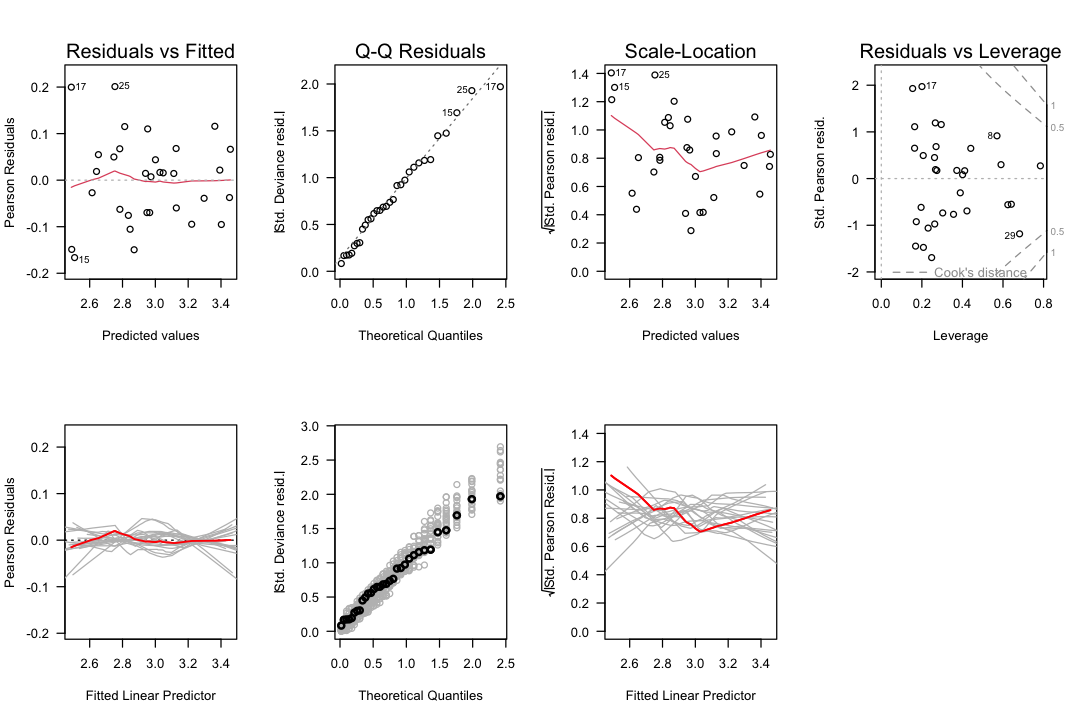
Interpretation:
If observed curves fall within the gray envelope (simulated fluctuation), there is no evidence against the assumption
If observed curves fall outside the envelope, there is evidence the assumption is violated
Example - Machine Failures Residual Analysis:
A machinery runs in two modes. The question is whether the number of failures depends on operating time in each mode. After fitting a Poisson regression model, we perform a residual and sensitivity analysis.
Diagnostic Plots Interpretation:
Tukey-Anscombe Plot: Smoother indicates some non-constant expectation, but within stochastic fluctuation (gray spaghetti) → Weak evidence against adequately specified expectation
Location-Scale Plot: Smoother decreasing but within stochastic fluctuation → No evidence against adequately specified variance
Normal Q-Q Plot: Points scatter around line, all black points within gray points → No evidence for outliers or distributional violations
Residual vs Leverage: All Cook’s distances < 1 → No observation with too large influence
Overall Conclusion: Model might be adequate, though there’s a weak hint that expectation might not be constant (but limited data prevents strong conclusions).
Statistical Soundness: Because there is no serious evidence against model assumptions, the statistical conclusions from the hypothesis test and overdispersion check are valid.
Example - Residual Analysis with Simulation:
The six diagnostic plots (Tukey-Anscombe, Normal Q-Q, Scale-Location) with simulation envelopes (gray lines and points) provide additional insights.
Purpose of Gray Lines and Points:
Gray lines: Show the scatter range of the smoother under model assumptions
Gray points: Show the scatter range of data points under model assumptions
Interpretation: If black (observed) structures lie outside the gray (simulated) structures, this is evidence the model does not adequately describe the data
Residual and Sensitivity Analysis for Yarn Breaks:
Tukey-Anscombe Plot:
Observation: Smoother is a reasonably straight horizontal line
Comparison: Within stochastic fluctuation (gray spaghetti)
Conclusion: No evidence that expectation is incorrectly specified
Normal Q-Q Plot:
Observation: Black points are not within stochastic fluctuation (gray points)
Interpretation: Evidence of distortions of the distributional assumption
Art of violation: Suggests overdispersion
Scale-Location Plot:
Observation: Red smoother has a weak trend, shifted upwards
Comparison: Outside stochastic fluctuation
Conclusion: Evidence that variance is incorrectly specified
Art of violation: Suggests overdispersion
Overall Conclusion: There is evidence that the model does not fit the data adequately. The identified violations suggest overdispersion is the main issue, which we addressed by using a quasi-Poisson model.
Residual Types for GLMs:
Response residuals: (observed - predicted)
Pearson residuals: (standardized)
Deviance residuals: Contribute to deviance statistic
# Extract different residual types
residuals(model, type = "response")
residuals(model, type = "pearson")
residuals(model, type = "deviance")
Output
Model Improvement: Finding Appropriate Transformations
Generalized Additive Models (GAMs) are excellent for exploring non-linear relationships in a data-driven manner:
Rule of Thumb: Predictor needs a transformation if a straight line does not fit between the confidence band or the P-value of the coresponding coefficient in Anova for Nonparametric Effects is smaller than 0.05
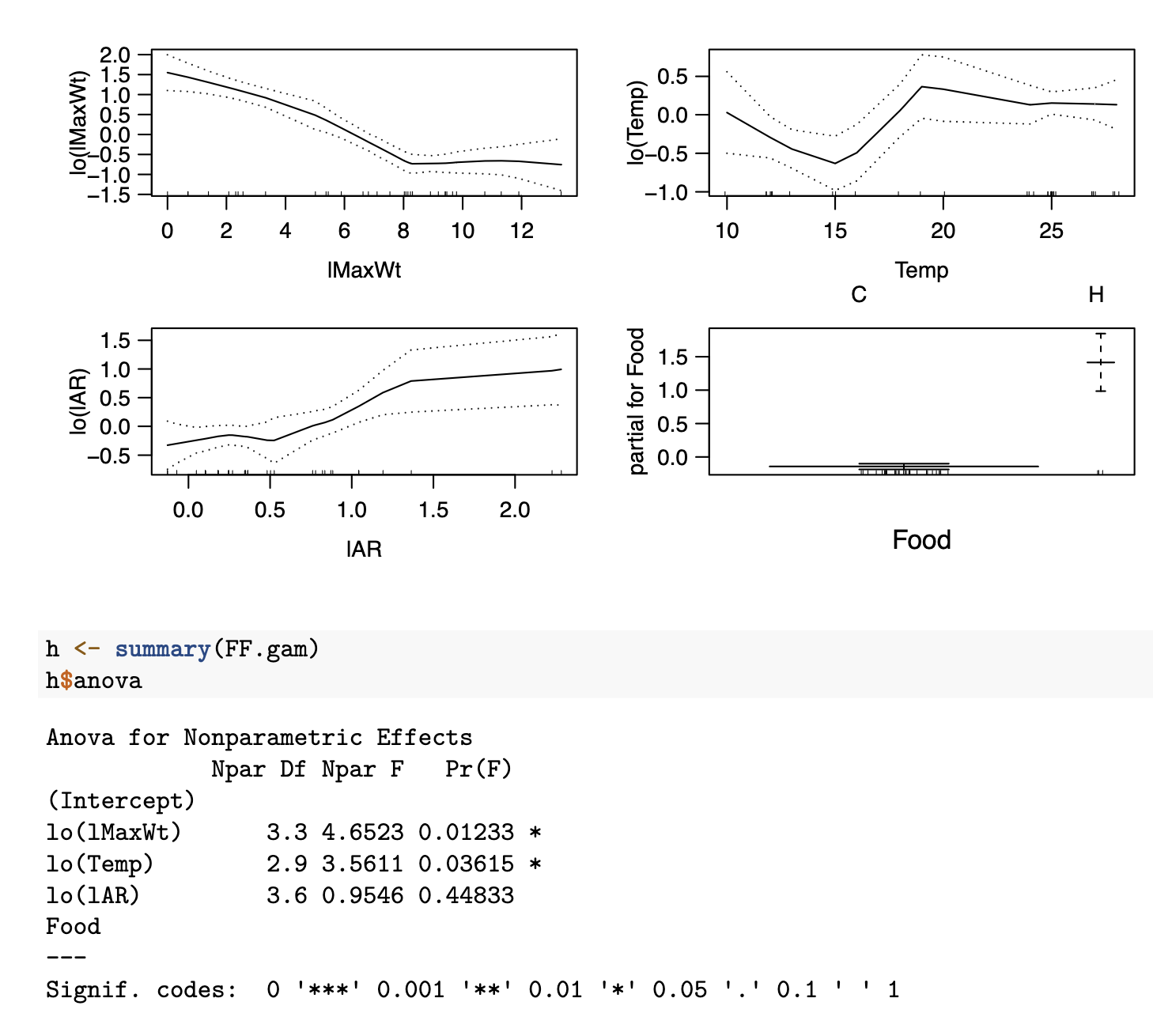
lMaxWtneeds an additional transformation; Hockeystick with L at 8Tempneeds a transformation as well: possible a factor variable withiTemp=0ifTemp < 17,iTemp=1otherwiselAR: no additional transformation is neededFoodis a factor variable and cannot be transformed in any case
Extensions of GLMs
Rate Models
Rate models analyze counts per unit exposure (e.g., accidents per kilometer driven, failures per machine-hour):
Where is the exposure (offset).
# Poisson regression with offset for ship damage data
glm(Damages ~ Year + Month + offset(log(Exposure)),
    family = poisson,
    data = ship)
Call:  glm(formula = Damages ~ Year + Month + offset(log(Exposure)),
    family = poisson, data = ship)

Coefficients:
(Intercept)       Year65       Year70       Year75      Month75
    -5.5607      -0.3086       0.2649     -18.2099           NA

Degrees of Freedom: 19 Total (i.e. Null);  16 Residual
Null Deviance:	    13.64
Residual Deviance: 10.54 	AIC: 26.54
Interpretation: The offset ensures we’re modeling the rate (counts per unit exposure) rather than raw counts.
Quasi-Likelihood Models
Quasi-models extend GLMs when the full distribution is not specified, requiring only the mean-variance relationship:
Quasi-Poisson:
Where is the dispersion parameter estimated from data.
# Quasi-Poisson for overdispersed count data
qp.model <- glm(breaks ~ wool * tension,
                family = quasipoisson,
                data = warpbreaks)
summary(qp.model)

# Dispersion parameter
qp.model$dispersion  # Should be > 1 if overdispersed
Output
Call:
glm(formula = breaks ~ wool * tension, family = quasipoisson,
    data = warpbreaks)

Coefficients:
               Estimate Std. Error t value Pr(>|t|)
(Intercept)     3.79674    0.09688  39.189  < 2e-16 ***
woolB          -0.45663    0.15558  -2.935 0.005105 **
tensionM       -0.61868    0.16374  -3.778 0.000436 ***
tensionH       -0.59580    0.16253  -3.666 0.000616 ***
woolB:tensionM  0.63818    0.23699   2.693 0.009727 **
woolB:tensionH  0.18836    0.25201   0.747 0.458436
---
Signif. codes:  0 ‘***’ 0.001 ‘**’ 0.01 ‘*’ 0.05 ‘.’ 0.1 ‘ ’ 1

(Dispersion parameter for quasipoisson family taken to be 3.76389)

    Null deviance: 297.37  on 53  degrees of freedom
Residual deviance: 182.31  on 48  degrees of freedom
AIC: NA

Number of Fisher Scoring iterations: 4
NULLCausality
Best Practices and Key Takeaways
Distinguish association from causation - correlation does not imply causation. The shoe size and salary example demonstrates how a common cause (gender) can create spurious associations.
Use DAGs to represent causal assumptions explicitly. Nodes are variables, directed edges are potential causal effects. Use the
gRbaseandgRainpackages to work with DAGs and Bayesian networks.Identify confounders and adjust for them appropriately using the backdoor criterion. The Nutrition-Disease example shows how to find valid adjustment sets.
Use d-separation to determine conditional independencies in the graph. The sprinkler network example illustrates the three basic structures (chain, fork, collider) and their independence properties.
Apply the backdoor criterion to find valid adjustment sets for causal effect estimation. This allows estimating causal effects from observational data when appropriate variables are measured.
Consider counterfactuals for individual-level causal questions using Pearl’s three-step method (abduction, action, prediction). The online sales example demonstrates practical counterfactual reasoning.
Validate causal models through sensitivity analysis, robustness checks, and external validation. Always question whether the causal assumptions are reasonable and test the stability of results.
Why Causal Inference Matters
Traditional statistics and machine learning excel at finding associations and making predictions, but they cannot answer causal questions without additional assumptions. Causal inference is essential when we want to understand what would happen if we changed something.
Key Distinction:
Association: - What is the probability of Y given X? Do people who drink more coffee tend to be more productive?
Intervention: - What would Y be if we set X to x? If I drink 20 cups of coffee, will I be more productive?
Counterfactual: - What would Y have been if X had been x, given that X was actually x’ and Y was y’? Would I have been more productive yesterday if I had drunk 20 cups of coffee instead of 2?
The first question can be answered with observational data, but the second and third require causal assumptions.
Causal Graphical Models
Causal graphical models (DAGs - Directed Acyclic Graphs) provide a language for representing causal assumptions explicitly.
Components:
Nodes: Random variables
Directed edges: Potential causal effects
Absence of edge: No direct causal effect
Terminology:
Parent: Node with directed edge to another node
Child: Node with directed edge from another node
Ancestor: Node with directed path to another node
Descendant: Node with directed path from another node
Adjacent: Nodes connected by an edge
Example - Bayesian Networks:
Building and querying Bayesian networks using the gRain package:
library(gRain)

# Define CPTs with explicit levels
cptSeason <- cptable(~Season,
    values = c(0.5, 0.5),
    levels = c("winter", "summer"))

cptSprinkler <- cptable(~Sprinkler | Season,  # Use | not :
    values = matrix(c(0.5, 0.5, 0.9, 0.1), nrow = 2, byrow = TRUE),
    levels = list(Sprinkler = c("off", "on"),
                Season = c("winter", "summer")))

# Build network
bn <- compileCPT(list(Season = cptSeason, Sprinkler = cptSprinkler))
bn <- grain(bn)

# Query probabilities
# querygrain(bn, nodes = c("Season"), type = "marginal")
# querygrain(bn, nodes = c("Season", "Sprinkler"), type = "conditional")
Graphical Building Blocks:
Chain (Mediation):
X affects Y through Z
Example: Education → Income → Happiness
Fork (Confounding):
Z is a common cause of X and Y
Example: Gender → (Shoe Size, Salary)
Collider (Selection):
Z is a common effect of X and Y
Example: Rain → Wet ← Sprinkler
Conditional Independence and D-Separation
Conditional Independence
Two variables X and Y are conditionally independent given Z if:
D-Separation: A path is d-separated (blocked) by a set of nodes Z if it contains a node that is:
Not in Z, and
Is a collider on that path
Two nodes X and Y are d-separated given Z if all paths between them are blocked by Z.
D-Separation Rules
| Structure | Independence | Conditional Independence Given Z |
|---|---|---|
| Chain: | Dependent | Independent (blocks chain) |
| Fork: | Dependent | Independent (blocks fork) |
| Collider: | Dependent | Dependent (opens collider) |
DAG Analysis
Source
options(repr.plot.width = 6, repr.plot.height = 3)
library(gRbase)

set.seed(253)

g <- dag(
  c("Nutrition", "Place of Residence"),
  c("Disease", "Medical Care", "Genetics", "Physical Activity", "Nutrition"),
  c("Medical Care", "Place of Residence")
)
par(mar = c(0.1, 0.1, 0.1, 0.1))
plot(g)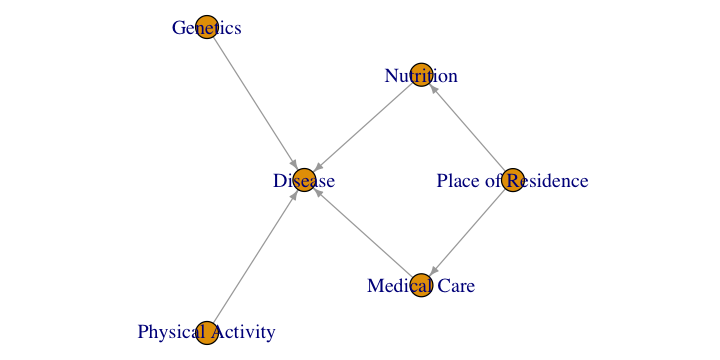
Descendants of Place of Residence
Answer: Medical Care, Nutrition, Disease
Explanation: Descendants are all nodes reachable via directed paths from Place of Residence. From Place of Residence, we can reach Nutrition directly, Medical Care directly, and Disease through Medical Care.
Direct Causal Effect of Place of Residence on Disease
Answer: 0
Justification: There is no direct edge from Place of Residence to Disease in the DAG. The effect is only indirect through Medical Care.
Independence Statements
i. Nutrition Medical Care | Place of Residence ?
Correct: There is a fork at Place of Residence (common cause of both Nutrition and Medical Care)
Reason: Conditioning on the common cause (Place of Residence) blocks the path between Nutrition and Medical Care, making them conditionally independent
ii. Nutrition Physical Activity | Disease ?
Incorrect: There is a collider at Disease (common effect of Nutrition and Physical Activity)
Reason: Conditioning on the collider (Disease) opens the path between Nutrition and Physical Activity, making them conditionally dependent
iii. Nutrition Genetics | Medical Care ?
Correct: The collider is Disease (not in conditioning set)
Reason: Medical Care is not a descendant of Disease. The collider path (Nutrition Disease Genetics) remains blocked because Disease is not in the conditioning set and Medical Care is not its descendant.
Regression for Total Causal Effect of Nutrition on Disease
To estimate the total causal effect of Nutrition on Disease, we must block the backdoor path: Nutrition Place of Residence Medical Care Disease
lm(Disease ~ Nutrition + PlaceOfResidence, data = data)Asymptotically Optimal Adjustment
The asymptotically optimal adjustment set minimizes the variance of the causal effect estimator:
= all causal nodes in the directed path from X to Y
= parents of set S
= forbidden nodes (all descendants of causal nodes including X)
Calculation:
(Disease is the only causal neighbor)
(parents of Disease)
(the variables themselves)
Optimal adjustment:
D-Separation Testing
Testing conditional independence in DAGs and verifying with data:
Source
options(repr.plot.width = 6, repr.plot.height = 2)

library(gRbase)

d.separates <- function(a,b,c,dag){
    separates(a,b,c, moralize(ancestralGraph(union(union(a,b),c),dag)))
}

dag.model <- dag("A",c("B","A","E"),c("C","A","B","D"),c("D","B"),c("E"))

par(mar = c(0.1, 0.1, 0.1, 0.1))
plot(dag.model)
Source
cat("Are E and D d-separated by Z = {B}?", d.separates("E", "D", c("B"), dag.model), "\n")
cat("Are E and C d-separated by Z = {A}?", d.separates("E", "C", c("A"), dag.model), "\n")
cat("Are A and D d-separated by Z = {B, C}?", d.separates("A", "D", c("B", "C"), dag.model), "\n")
Are E and D d-separated by Z = {B}? TRUE
Are E and C d-separated by Z = {A}? FALSE
Are A and D d-separated by Z = {B, C}? FALSE
Simpson’s Paradox
Simpson’s Paradox occurs when a trend appears in different groups of data but disappears or reverses when these groups are combined.
Example: Layoffs
Overall: More layoffs in Department A than Department B
Within each gender: More layoffs in Department B than Department A
Resolution: Gender distribution differs between departments (more men in A, more women in B, and men are laid off more regardless of department)
Causal Explanation: The paradox arises because gender is a confounder - it affects both the department (exposure) and layoffs (outcome). When we aggregate across genders, the confounding effect creates the paradox.
Solution: Adjust for the confounder (gender) to see the true relationship within each gender group.
Factorization of Joint Distributions
For a DAG, the joint distribution factorizes according to the graph structure:
Where are the parents of node in the DAG.
Example: Medical Diagnosis
Where:
D = Disease
S = Symptom
C = Test Result
Interpretation: Disease affects both Symptom and Test Result, but Symptom and Test Result are independent given Disease (d-separated by Disease).
Causal Effect Estimation
Causal effect measures how an intervention on X affects Y:
Adjustment Formula: If we can find a set Z that satisfies the backdoor criterion, we can estimate causal effects from observational data:
Backdoor Criterion: A set of variables Z satisfies the backdoor criterion relative to X and Y if:
Z blocks all backdoor paths from X to Y
Z does not contain any descendants of X
Finding Adjustment Sets:
Identify all backdoor paths from X to Y
For each path, find a set that blocks it
Combine these sets, ensuring no new paths are opened
Example - Adjustment Formula:
Estimating causal effects with adjustment: Use backdoor criterion and adjust for all parents of Nutrition that are not descendants.
lm(Disease ~ Nutrition + PlaceOfResidence, data = data)Structural Causal Models (SCMs)
Structural Causal Models combine causal graphs with structural equations that describe the data-generating process:
Where:
= endogenous variable
= parents of in the causal graph
= exogenous (noise) variable
= structural function
Linear SCMs:
Direct vs. Total Causal Effects:
Direct effect: Effect of X on Y not mediated through other variables
Total effect: Sum of direct effect + all indirect effects
Example: Linear SCM
Direct effect of X on Y:
Direct effect of X on Z:
Direct effect of Y on Z:
Total effect of X on Z:
Estimating Causal Effects: For linear SCMs, causal effects can be estimated using regression with appropriate adjustment:
# Estimate total causal effect of Nutrition on Disease
# Adjust for confounding variables (Place of Residence)
lm(Disease ~ Nutrition + PlaceOfResidence, data = data)
Assumptions of Linear SCMs:
Known causal structure
Linear relationships
Uncorrelated errors
No unmeasured confounders
Limitations:
Requires prior knowledge of causal structure
Linear assumption may not hold
Errors may be correlated in practice
Example - Linear SCMs: Defining and working with linear structural causal models:
# Define SCM
X <- rnorm(100)
E_Y <- rnorm(100)
E_Z <- rnorm(100)
Y <- 2 + 1.5 * X + E_Y
Z <- 3 + 2 * X + 0.8 * Y + E_Z

# Estimate effects
lm(Y ~ X)
lm(Z ~ X + Y)
Call:
lm(formula = Y ~ X)

Coefficients:
(Intercept)            X
      1.971        1.719
Call:
lm(formula = Z ~ X + Y)

Coefficients:
(Intercept)            X            Y
     3.0795       2.2095       0.8097
Interventional vs. Observational Data
Experimental Data:
Researchers randomly assign treatments
Groups are comparable (except for treatment)
Gold standard for causal inference
Example: Randomized controlled trial (RCT)
Observational Data:
Researchers observe naturally occurring variation
Groups may differ systematically (confounding)
Requires adjustment for valid causal inference
Example: Cohort study, case-control study
Key Difference:
Experimental: (randomization blocks confounders)
Observational: (confounding may be present)
Example: Shoe Size and Salary
Observational: People with larger shoes tend to have higher salaries
Reason: Gender affects both shoe size and salary (confounding)
Experimental: If we randomly assign shoe sizes, no effect on salary
Conclusion: No causal effect of shoe size on salary
Example - Ice Cream, Temperature, Emergencies:
Context: Observational data from 146 cities recording temperature (moderate/high), emergency calls (low/high), and ice cream sales (low/high).
Causal Graph:
Source
options(repr.plot.width = 6, repr.plot.height = 1)

library(gRbase)

dag.model <- dag(
    c("IceCream","Temp"),
    c("Emergency","Temp"))

par(mar = c(0.1, 0.1, 0.1, 0.1))
plot(dag.model)
Why Classical Model Finds Relationship:
Observation: Ice cream sales and emergency calls are positively associated
Reason: Temperature is a confounding variable - it affects both ice cream sales and emergency calls
Spurious correlation: The association is due to the common cause, not a direct causal effect
Conditional Probabilities:
# P(nEmergencies = high | IceCream = high)
(14 + 2) / 103  # 0.1553

# P(nEmergencies = high | IceCream = low)
(4 + 1) / 43   # 0.1163

# Risk ratio
0.1553 / 0.1163  # 1.34 times higher
Interventional Probabilities:
do(IceCream = high) meaning: An intervention that sets ice cream sales to high for everyone, regardless of temperature or other factors.
Difference between P(Y|X) and P(Y|do(X)):
P(Y|X): Conditional probability - likelihood of Y among those who happened to have X
P(Y|do(X)): Interventional probability - likelihood of Y if we set X to a specific value
In most cases: P(Y|X) ≠ P(Y|do(X)) due to confounding
How the Graph Changes with do(IceCream = high):
The arrow from Temperature → IceCream is removed (intervention makes IceCream independent of Temperature)
Temperature still affects Emergency Calls directly
Calculating P(nEmergency = high | do(IceCream = high)): Using the adjustment formula:
# P(Temp = high) = 88/146 = 0.6027
# P(Temp = moderate) = 58/146 = 0.3973

# P(nEmergency = high | IceCream = high, Temp = high)
14 / (56 + 14)  # 0.2000

# P(nEmergency = high | IceCream = high, Temp = moderate)
2 / (31 + 2)    # 0.0606

# Interventional probability
0.2000 * 0.6027 + 0.0606 * 0.3973  # 0.1446
Calculating P(nEmergency = high | do(IceCream = low)):
# P(nEmergency = high | IceCream = low, Temp = high)
4 / (14 + 4)  # 0.2000

# P(nEmergency = high | IceCream = low, Temp = moderate)
1 / (24 + 1)  # 0.0400

# Interventional probability
0.2000 * 0.6027 + 0.0400 * 0.3973  # 0.1498
Causal Effect of IceCream on Emergency:
0.1446 - 0.1498 # -0.0052Conclusion: The estimated causal effect is approximately 0, suggesting no causal effect of ice cream sales on emergency calls. The observed association (1.34 times higher risk) is entirely due to confounding by temperature. This demonstrates why it’s crucial to distinguish between association and causation.
Instrumental Variables (IV)
When confounders are unmeasured, standard regression cannot estimate causal effects. Instrumental variables provide a solution.
Valid Instrument Z must satisfy:
Relevance: Z is associated with X (not too weak)
Exclusion restriction: Z has no direct effect on Y (only through X)
Independence: Z is independent of all confounders of X and Y
Two-Stage Least Squares (2SLS):
Regress X on Z to get predicted values
Regress Y on to estimate causal effect
library(AER)

# 2SLS using ivreg
iv.model <- ivreg(Y ~ X + W | Z + W, data = data)
summary(iv.model)
Example: Education and Earnings
X: Education (years)
Y: Earnings
Z: Quarter of birth (affects education due to school entry age, but not earnings directly)
Assumption: Quarter of birth is independent of ability, family background, etc.
Counterfactual Reasoning
Counterfactuals answer questions like: “What would have happened if...?” for specific individuals.
Pearl’s Three-Step Method:
Abduction: Use observed data to infer the distribution of exogenous variables
Estimate the structural error terms from observed data
Action: Modify the structural equations to reflect the intervention
Set the variable of interest to its counterfactual value
Prediction: Use the modified model to predict the counterfactual outcome
Compute the new value based on the modified equations
Example - Online Sales Counterfactual:
Given observed: Visits = 179, Discount = 19%, Sales = 101 Question: What would sales be if Discount = 10%?
Estimated SCM from LiNGAM: Using the LiNGAM algorithm on historical sales data:
library(pcalg)
fit.sales <- lingam(dat_sales)
B <- round(fit.sales$Bpruned, 2)
colnames(B) <- rownames(B) <- colnames(dat_sales)
B
#        sales adv visits discount
# sales     0 0.00   0.24    0.18
# adv       0 0.00   0.00    0.00
# visits    0 1.79   0.00    0.00
# discount  0 0.00   0.00    0.00
Estimated DAG:
Adv → Visits (coefficient: 1.79)
Visits → Sales (coefficient: 0.24)
Discount → Sales (coefficient: 0.18)
No direct effect of Adv on Sales (only indirect through Visits)
Step 1 - Abduction:
# Estimate structural error for Sales
ES <- 101 - (55.65 + 0.24 * 179 + 0.18 * 19)
# ES = -1.03
Step 2 - Action: Modify SCM for intervention do(Discount = 10):
Step 3 - Prediction:
visits <- 179  # Held constant (no intervention on visits)
discount <- 10  # Intervention
Sales <- 55.65 + 0.24 * visits + 0.18 * discount + ES
# Sales = 99.38
Conclusion: If the discount had been 10% instead of 19%, they would have sold approximately 99 items (2 fewer than the observed 101).
Example - Pearl’s Three-Step Method: General template for counterfactual reasoning:
# Pearl's three-step method
# Step 1: Abduction
ES <- observed.Y - (beta0 + beta1 * observed.X)

# Step 2: Action
# Modify structural equation for intervention

# Step 3: Prediction
counterfactual.Y <- beta0 + beta1 * intervention.X + ES
Markov Equivalence
Markov Equivalence refers to the fact that different DAGs can represent the same conditional independence relationships.
Markov Equivalent Classes:
Chains and forks are Markov equivalent
CPDAGs (Completed Partially Directed Acyclic Graphs) represent equivalence classes
Example: The following DAGs are Markov equivalent (they encode the same conditional independencies):
All three imply:
Implications:
Without additional assumptions, we cannot distinguish between Markov equivalent DAGs from observational data alone
We need experimental data or strong assumptions to identify the true causal structure
Causal Structure Learning
Causal structure learning is the process of discovering causal relationships from data.
PC Algorithm (Peter & Clark, 1991)
The PC algorithm is a constraint-based method that:
Starts with a fully connected undirected graph
Tests for conditional independencies in the data
Removes edges where conditional independence is found
Orients edges based on v-structures (colliders)
library(pcalg)

# Create skeleton (undirected graph)
skeleton <- pc(data, alpha = 0.05)

# Orient edges
pc.fit <- pc(skeleton, data, alpha = 0.05)

# Visualize
plot(pc.fit)
Assumptions:
Causal sufficiency: All common causes are measured
Causal Markov condition: D-separation implies conditional independence
Faithfulness: No independence relationships are “accidental”
LiNGAM Algorithm (Linear Non-Gaussian Acyclic Model)
LiNGAM identifies the full causal structure (not just Markov equivalence class) by assuming:
Linear relationships
Non-Gaussian errors
Acyclic structure
How it works: Uses Independent Component Analysis (ICA) to identify the causal order.
library(pcalg)

# Fit LiNGAM model
fit.lingam <- lingam(data)

# B matrix contains edge weights
B <- fit.lingam$Bpruned
colnames(B) <- rownames(B) <- colnames(data)

# Confidence intervals
ci <- fit.lingam$ci

# Visualize
plot(fit.lingam)
Example: Online Sales Data
# Fit LiNGAM to sales data
fit.sales <- lingam(dat_sales)
B <- round(fit.sales$Bpruned, 2)

# Resulting DAG:
# Adv -> Visits -> Sales
# Discount -> Sales
# (No direct effect of Adv on Sales, only through Visits)
Source
options(repr.plot.width = 6, repr.plot.height = 1)

library(gRbase)

dag.model <- dag(
    c("Sales","Visits", "Discount"),
    c("Visits","Adv"))

par(mar = c(0.1, 0.1, 0.1, 0.1))
plot(dag.model)
Four Steps of Causal Inference
Step 1: Create a Causal Model
Use expert knowledge to specify a DAG
Represent all relevant variables and their causal relationships
Step 2: Identify the Causal Effect
Determine if the causal effect can be identified from observational data
Use d-separation and backdoor criterion to find valid adjustment sets
Step 3: Estimate the Causal Effect
Apply adjustment formula or other identification strategies
Use appropriate statistical methods (regression, matching, etc.)
Step 4: Test/Validate the Results
Check sensitivity to modeling assumptions
Test robustness to different specifications
Validate with external data if available